
Arduino Project 044 - Simple RFID Reader
Arduino Programming Basic -- Making an RFID Reader
Project 44 Simple RFID Reader
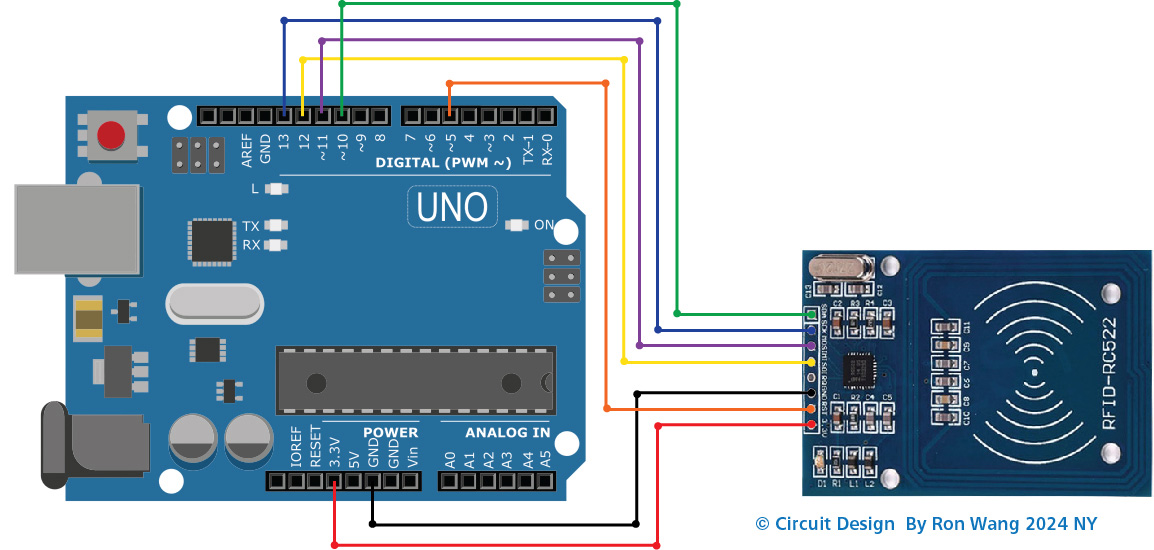
Wiring Diagram Between RC522 and Arduino without voltage regulator
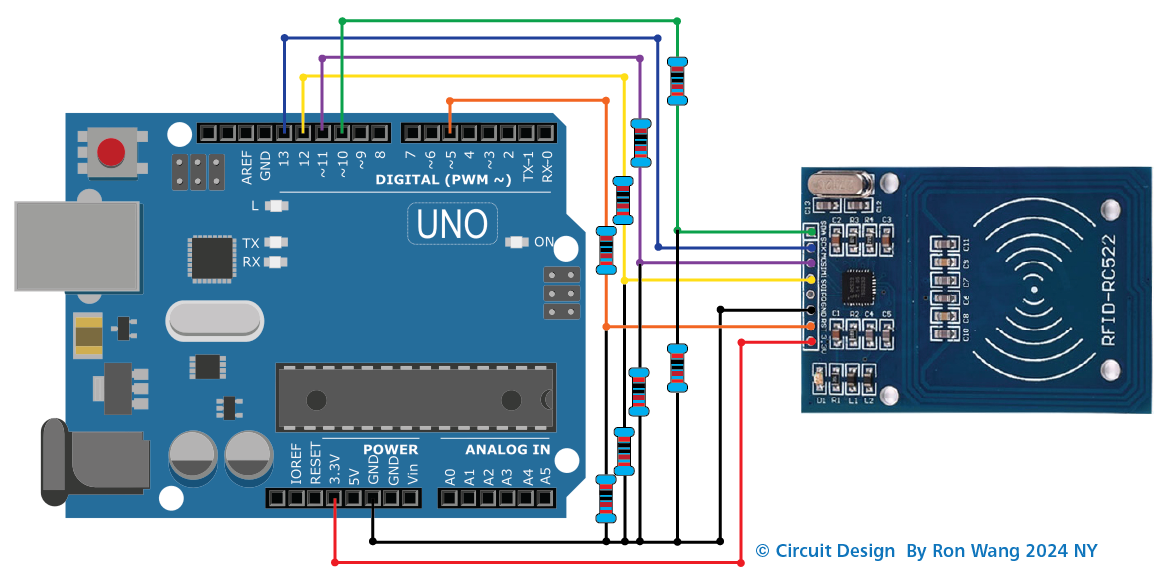
Wiring Diagram Between RC522 and Arduino with voltage regulator
As Circuit in the wiring diagram above, 1kOhM and 2kOhm pair of resistors are used to regulate 5V to 3.3V. It does not need to adjust the voltage between the Arduino pin and the MISO pin of the RC522 module. However, it is necessary to regulate the voltage between the Arduino pins and the SS, SCK, MOSI, and RST pins of the RC522 module.
// Project 44  Simple RFID Reader   Arduino-RFID-NFC

#include <SPI.h>
#include <MFRC522.h>

#define SS_PIN 10
#define RST_PIN 5

MFRC522 rfid(SS_PIN, RST_PIN);

void setup() {
  Serial.begin(9600);
  SPI.begin(); // init SPI bus
  rfid.PCD_Init(); // init MFRC522

  Serial.println("Tap RFID/NFC Tag on reader");
}

void loop() {
  if (rfid.PICC_IsNewCardPresent()) { // new tag is available
    if (rfid.PICC_ReadCardSerial()) { // NUID has been readed
      MFRC522::PICC_Type piccType = rfid.PICC_GetType(rfid.uid.sak);
      //Serial.print("RFID/NFC Tag Type: ");
      //Serial.println(rfid.PICC_GetTypeName(piccType));

      // print NUID in Serial Monitor in the hex format
      Serial.print("UID:");
      for (int i = 0; i < rfid.uid.size; i++) {
        Serial.print(rfid.uid.uidByte[i] < 0x10 ? " 0" : " ");
        Serial.print(rfid.uid.uidByte[i], HEX);
      }
      Serial.println();

      rfid.PICC_HaltA(); // halt PICC
      rfid.PCD_StopCrypto1(); // stop encryption on PCD
    }
  }
} 版权声明:本文为原创文章,版权归donstudio所有,欢迎分享本文,转载请保留出处!