
Arduino Project 035 - Keypad 4X4 or 4X3
Most of the time we are used key, button, or switch to get input value in our projects. When we interface one key, button, or switch to the microcontroller then it needs one GPIO pin. But when we want to interface many keys like 9, 12 or 16, etc., then it needs many GPIO pins of a microcontroller and we will lose many GPIO pins.
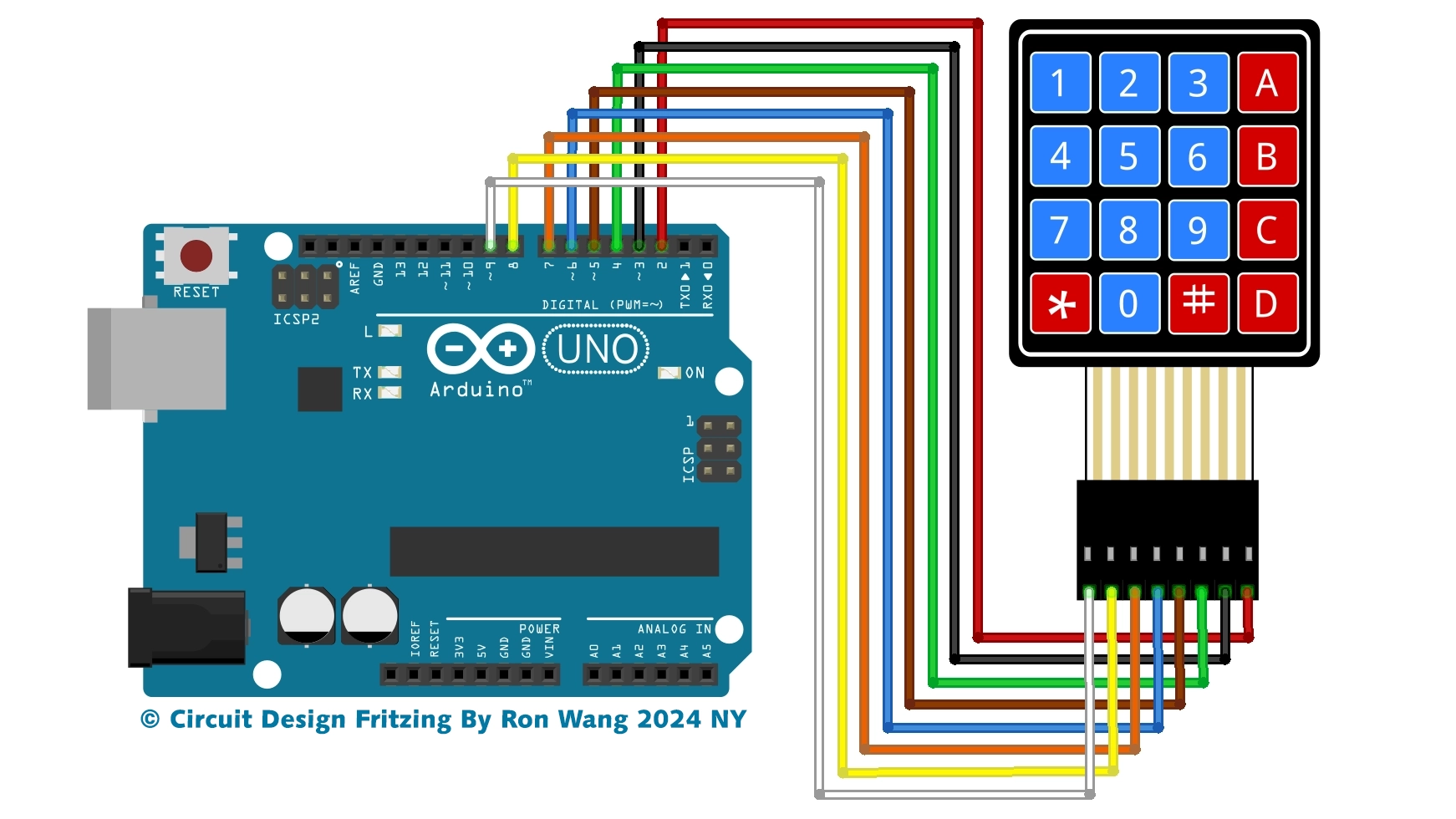
The 4×4 matrix keypad is a device that can solve this problem. The 4×4 matrix keypad is an input device, it usually used to provide input value in a project. It has 16 keys in total, which means it can provide 16 input values. The most interesting thing is it used only 8 GPIO pins of a microcontroller.
These Keypad modules are made of thin, flexible membrane material. The 4 x4 keypad module consists of 16 keys, these Keys are organized in a matrix of rows and columns. All these switches are connected to each other with a conductive trace. Normally there is no connection between rows and columns. When we will press a key, then a row and a column make contact.
Project 35 4X4 Keypad
#include <Keypad.h>
const int ROW_NUM = 4; //four rows
const int COLUMN_NUM = 4; //four columns
char keys[ROW_NUM][COLUMN_NUM] = {
  {'1','2','3', 'A'},
  {'4','5','6', 'B'},
  {'7','8','9', 'C'},
  {'*','0','#', 'D'}
};
byte pin_rows[ROW_NUM] = {9, 8, 7, 6}; //connect to the row pinouts of the keypad
byte pin_column[COLUMN_NUM] = {5, 4, 3, 2}; //connect to the column pinouts of the keypad
Keypad keypad = Keypad( makeKeymap(keys), pin_rows, pin_column, ROW_NUM, COLUMN_NUM );
void setup(){
  Serial.begin(9600);
}
void loop(){
  char key = keypad.getKey();
  if (key){
    Serial.println(key);
  }
}
3X4 Keypad
#include <Keypad.h>
const int ROW_NUM = 4; //four rows
const int COLUMN_NUM = 3; //three columns
char keys[ROW_NUM][COLUMN_NUM] = {
  {'1','2','3'},
  {'4','5','6'},
  {'7','8','9'},
  {'*','0','#'}
};
byte pin_rows[ROW_NUM] = {9, 8, 7, 6}; //connect to the row pinouts of the keypad
byte pin_column[COLUMN_NUM] = {5, 4, 3}; //connect to the column pinouts of the keypad
Keypad keypad = Keypad( makeKeymap(keys), pin_rows, pin_column, ROW_NUM, COLUMN_NUM );
void setup(){
  Serial.begin(9600);
}
void loop(){
  char key = keypad.getKey();
  if (key){
    Serial.println(key);
  }
}
Keypad Password Coding
#include <Keypad.h>
const int ROW_NUM = 4; //four rows
const int COLUMN_NUM = 4; //four columns
char keys[ROW_NUM][COLUMN_NUM] = {
  {'1','2','3', 'A'},
  {'4','5','6', 'B'},
  {'7','8','9', 'C'},
  {'*','0','#', 'D'}
};
byte pin_rows[ROW_NUM] = {9, 8, 7, 6}; //connect to the row pinouts of the keypad
byte pin_column[COLUMN_NUM] = {5, 4, 3, 2}; //connect to the column pinouts of the keypad
Keypad keypad = Keypad( makeKeymap(keys), pin_rows, pin_column, ROW_NUM, COLUMN_NUM );
const String password = "123456"; // Change your password here
String input_password;
void setup(){
  Serial.begin(9600);
  input_password.reserve(16); // maximum input characters is 17, change if needed
}
void loop(){
  char key = keypad.getKey();
  if (key){
    Serial.println(key);
    if(key == '*') {
      input_password = ""; // clear input password
    } else if(key == '#') {
      if(password == input_password) {
        Serial.println("password is correct");
        // DO YOUR WORK HERE

      } else {
        Serial.println("password is incorrect, try again");
      }
      input_password = ""; // clear input password
    } else {
      input_password += key; // append new character to input password string
    }
  }
}版权声明:本文为原创文章,版权归donstudio所有,欢迎分享本文,转载请保留出处!