
Arduino Project 023B - Liquid Crystal Displays -Blink and Cursor
Before wiring the LCD screen to your Arduino board we suggest to solder a pin header strip to the 14 (or 16) pin count connector of the LCD screen, as you can see in the image further up.
To start with, you will create a demonstration project that will show off most of the functions available in the LiquidCrystal.h library. To do so, you’ll use a backlit 16x2 LCD Display.
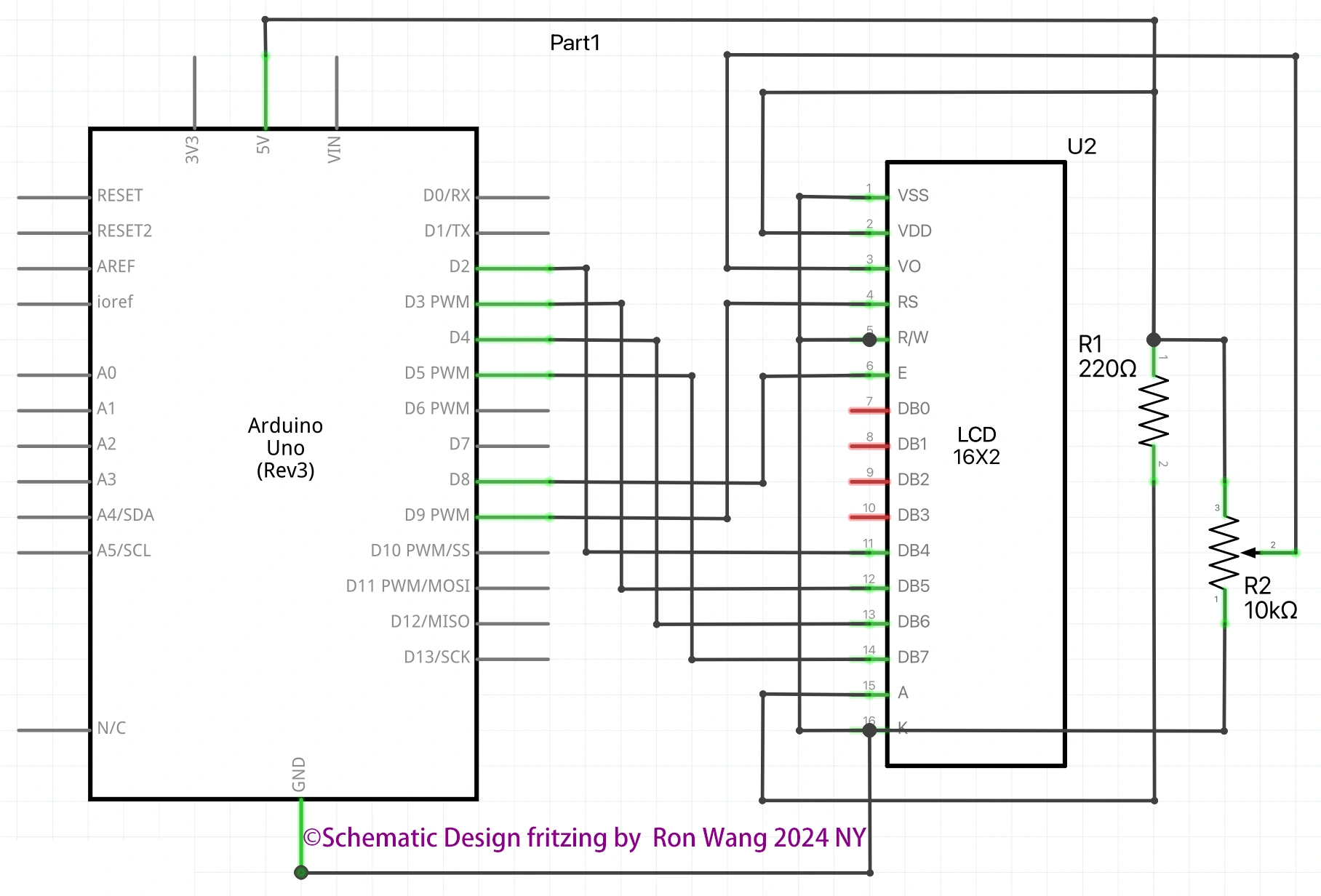
To wire your LCD screen to your board, connect the following pins:
LCD RS pin to digital pin 9
LCD Enable pin to digital pin 8
LCD D4 pin to digital pin 5
LCD D5 pin to digital pin 4
LCD D6 pin to digital pin 3
LCD D7 pin to digital pin 2
LCD R/W pin to GND
LCD VSS pin to GND
LCD VCC pin to 5V
LCD LED+ to 5V through a 220 ohm resistor
LCD LED- to GND
Project 23B-1 Liquid Crystal Displays -Blink
/* Coding Ron Wang
   Oct.24th 2024
   Autaba support for coding hardware
   Project 23B  Basic LCD Control - Blink
 */

#include <LiquidCrystal.h>
// Initialize the library with the numbers of the interface pins
const int rs = 9, en = 8, d4 = 5, d5 = 4, d6 = 3, d7 = 2;
LiquidCrystal lcd(rs, en, d4, d5, d6, d7);
void setup() {
  // set up the LCD's number of columns and rows:
  lcd.begin(16, 2);
  // Print a message to the LCD.
  lcd.print("Hello, World!");
}
void loop() {
  // Turn off the blinking cursor:
  lcd.noBlink();
  delay(3000);
  // Turn on the blinking cursor:
  lcd.blink();
  delay(3000);
}
Project 23B-2 Liquid Crystal Displays -Cursor
/* Coding Ron Wang
   Oct.25th 2024
   Autaba support for coding hardware
   Project 23C  Basic LCD Control- Cursor
 */

#include <LiquidCrystal.h>
// Initialize the library with the numbers of the interface pins
const int rs = 9, en = 8, d4 = 5, d5 = 4, d6 = 3, d7 = 2;
LiquidCrystal lcd(rs, en, d4, d5, d6, d7);
void setup() {
  // set up the LCD's number of columns and rows:
  lcd.begin(16, 2);
  // Print a message to the LCD.
  lcd.print("Hello, World!");
}
void loop() {
  // Turn off the cursor:
  lcd.noCursor();
  delay(500);
  // Turn on the cursor:
  lcd.cursor();
  delay(500);
}
Project 23B-3 Liquid Crystal Displays - Set Cursor
/* Coding Ron Wang
   Oct.27th 2024
   Autaba support for coding hardware
   Project 23E  Basic LCD Control- Set Cursor Example
 */

#include <LiquidCrystal.h>
// Initialize the library with the numbers of the interface pins
const int rs = 9, en = 8, d4 = 5, d5 = 4, d6 = 3, d7 = 2;
LiquidCrystal lcd(rs, en, d4, d5, d6, d7);
// these constants won't change.  But you can change the size of
// your LCD using them:
const int numRows = 2;
const int numCols = 16;
void setup() {
  // set up the LCD's number of columns and rows:
  lcd.begin(numCols, numRows);
}
void loop() {
  // loop from ASCII 'a' to ASCII 'z':
  for (int thisLetter = 'a'; thisLetter <= 'z'; thisLetter++) {
    // loop over the columns:
    for (int  thisRow = 0; thisRow < numRows; thisRow++) {
      // loop over the rows:
      for (int thisCol = 0; thisCol < numCols; thisCol++) {
        // set the cursor position:
        lcd.setCursor(thisCol, thisRow);
        // print the letter:
        lcd.write(thisLetter);
        delay(200);
      }
    }
  }
}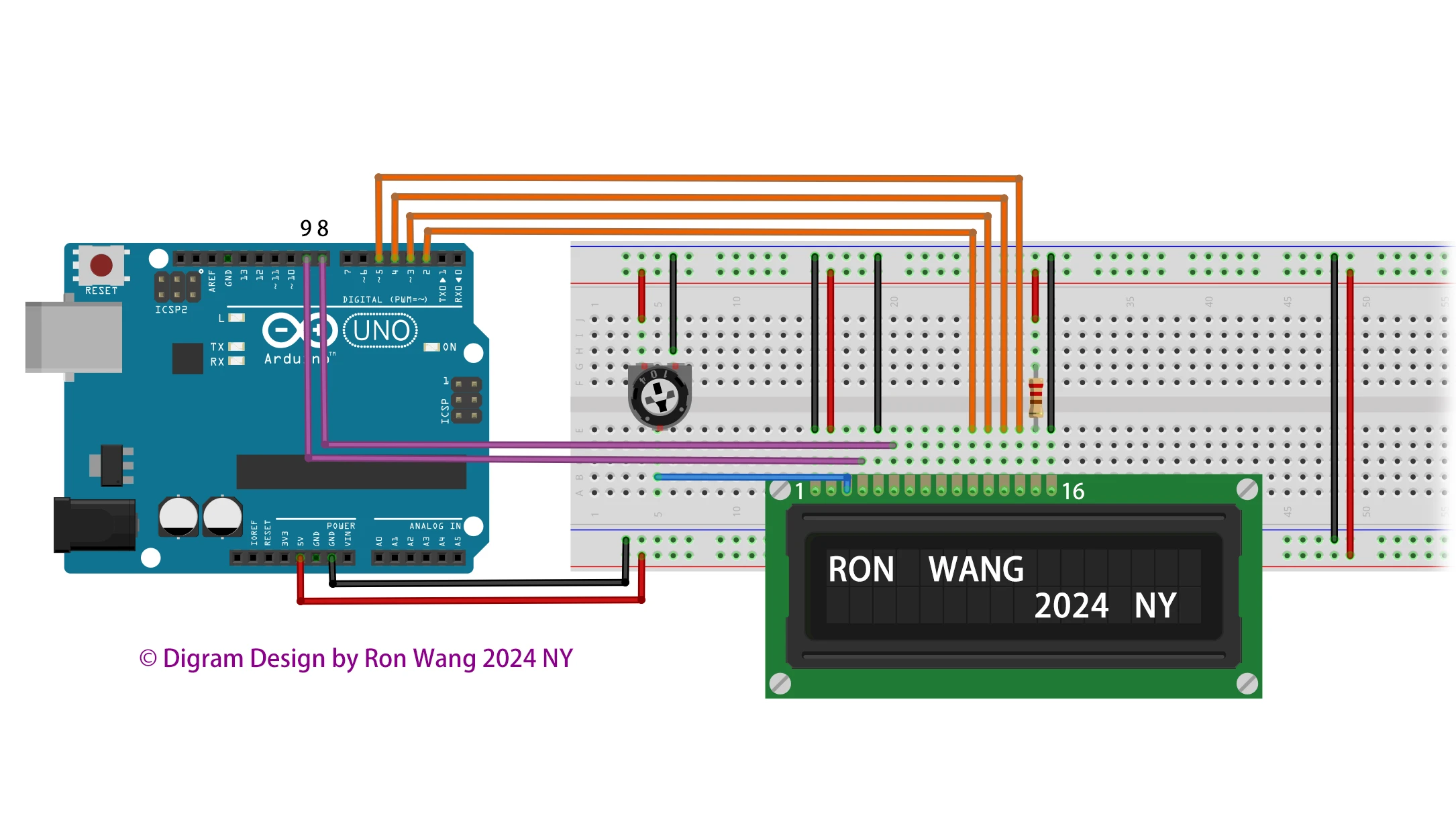
Additionally, wire a 10k potentiometer to +5V and GND, with it's wiper (output) to LCD screens VO pin (pin3).
版权声明:本文为原创文章,版权归donstudio所有,欢迎分享本文,转载请保留出处!